Get found on Google & by AI assistants
Search engines and AI assistants both need the same handful of facts about you: what you cook, roughly what it costs, and exactly where you are. Fill them in once and Higgs publishes them in the formats each one reads.
- 1
Open Settings in the sidebar — the discovery fields sit on the Restaurant tab.
- 2
Set your cuisine ("Korean BBQ", "Neapolitan pizza") and a price band from $ to $$$$. These are exactly what Google shows in a restaurant result.
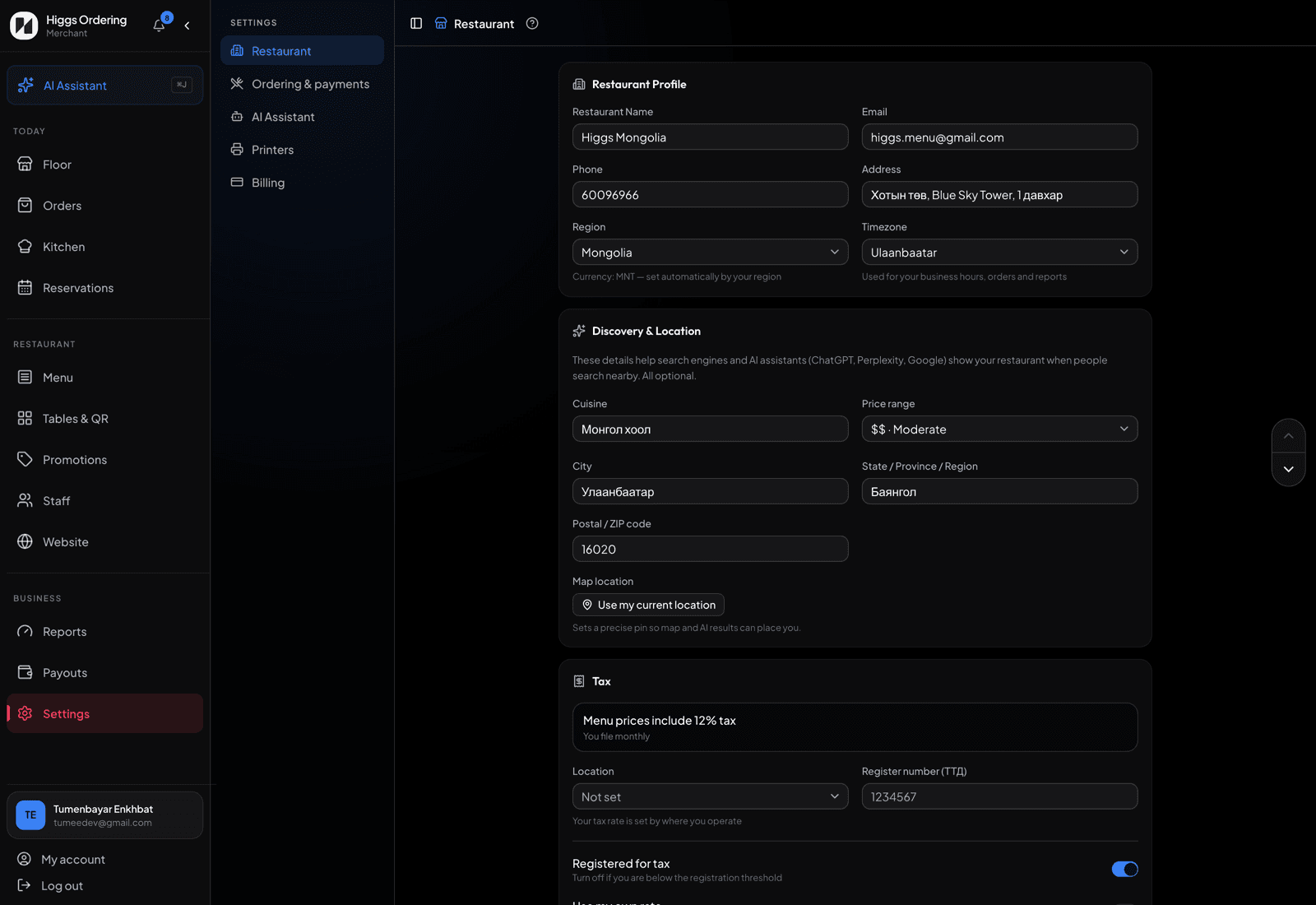
Cuisine, price band, and an accurate map pin. - 3
Fill in your city, region/state and postal code, then tap "Use my current location" while standing in the restaurant to drop an accurate map pin.
- 4
Complete your address, phone and opening hours if you haven’t — they feed the same listing, and they’re what an assistant reads out when someone asks "is it open now?".
- 5
Higgs publishes the rest for you: structured restaurant and menu data, a per-restaurant preview image for links shared in chats, and a machine-readable summary AI assistants can read.
TipThis covers your own site. Getting listed in Google Business Profile and local directories is separate — and still worth an afternoon.