Add allergens, diet tags & ingredients
These three fields are what make the guest AI genuinely useful — and what lets guests filter your menu themselves. They take a few seconds per item and answer the questions your staff get asked all night.
- 1
Open an item in the Menu editor and scroll to its details.
- 2
Tick any of the 14 standard allergens the dish contains — gluten, dairy, nuts, fish and so on. These are the EU-14 list, the same set restaurants are asked about everywhere.
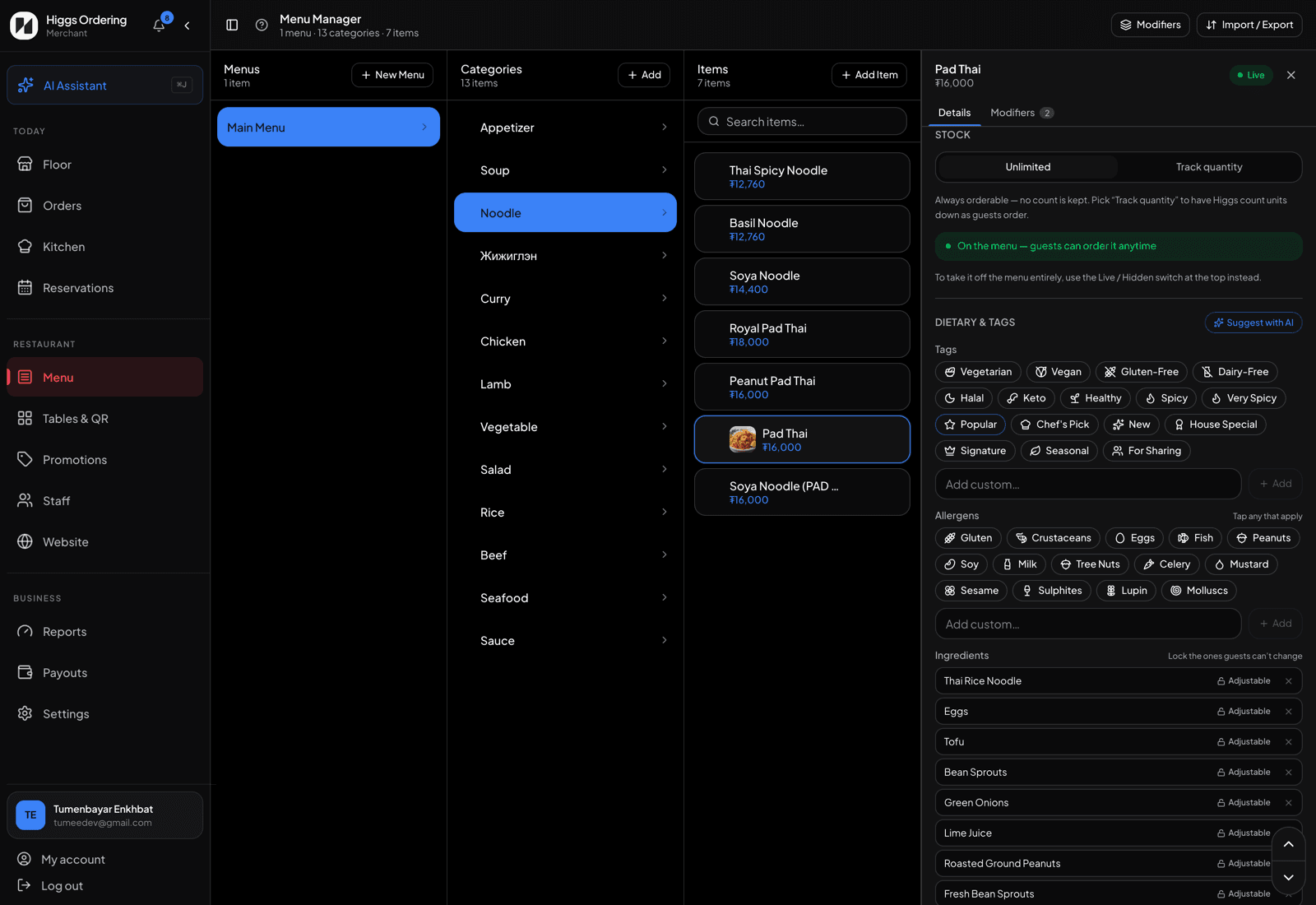
Allergens, diet tags, and ingredients with the lock toggle. - 3
Add diet and experience tags — vegan, vegetarian, spicy, halal. Guests can filter your menu by these, and the tags show as small icons on the item card.
- 4
List the ingredients. By default guests can ask for one removed or "less/extra" when they order; lock the ones that define the dish (the cheese in a cheeseburger) so they’re shown but can’t be changed.
- 5
Pick a tax class for the item if your region taxes food, alcohol and soft drinks differently. Food is the default.
Tip"Is this gluten-free?" is the single most common guest question. Filling in allergens is the highest-value five minutes you can spend on your menu.